

Last month, we introduced Odie, our AI assistant. We recently tested Odie against a public benchmark, and wanted to share our findings.
Gorgias, an ecommerce support software company, published a benchmark that lists 18 AI support vendors and ranks 13 of them on the same scripted conversations against the same public rubric. It tests two jobs: a pre-sale shopping assistant and a post-sale support agent. I wanted to know where Odie would land, so we ran the logged-out version (the one a visitor meets before signing in) on WooCommerce.com and WordPress.com through both jobs. We ran their 26 checks across 71 conversations in these 4 scenarios.
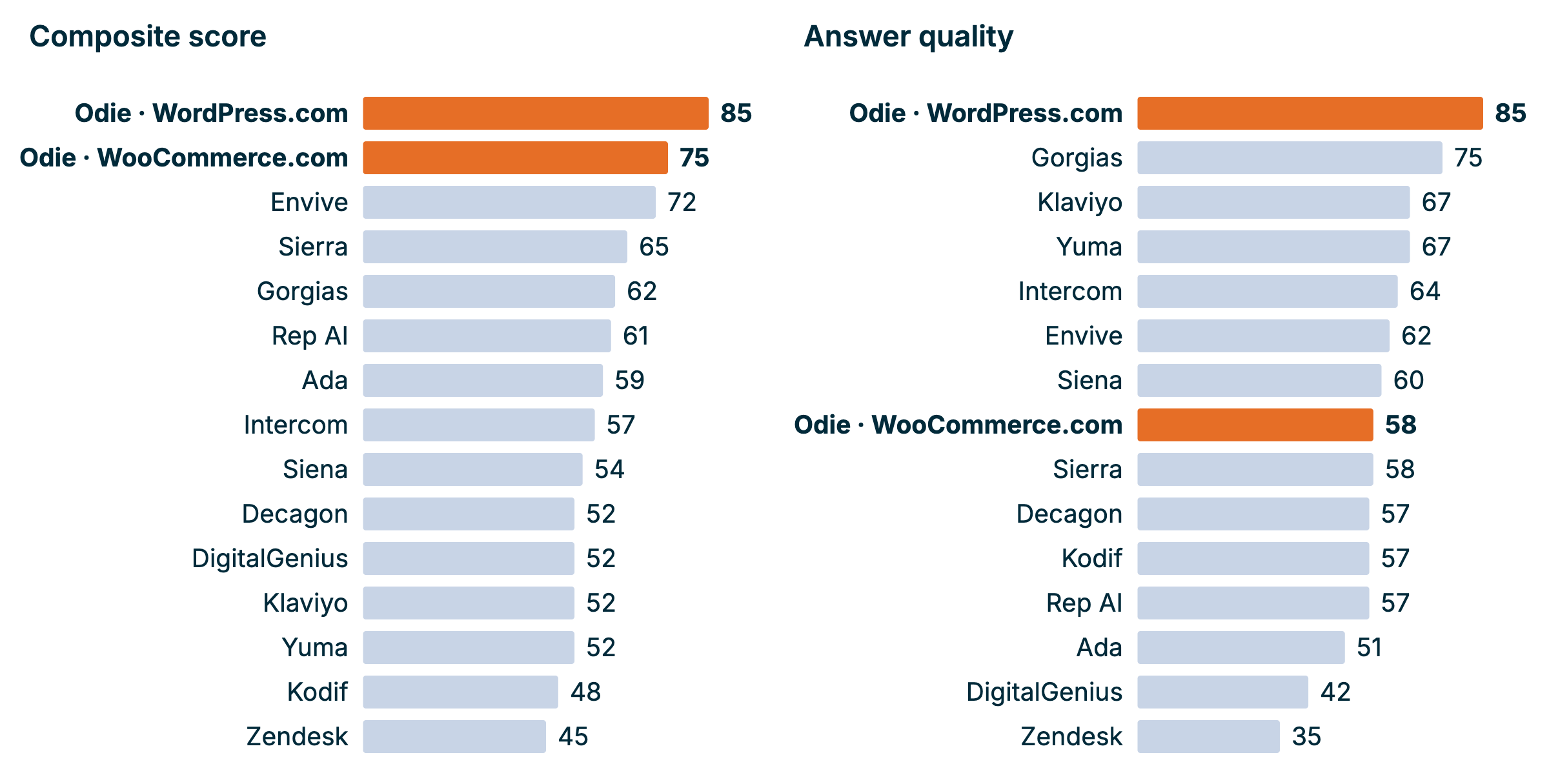
At first, it looks like Odie performed amazingly. Across the board, our compounded results were best in class. On WordPress.com, most of that holds up when you look closer. On WooCommerce.com, the compounded score hides some challenges. So we’re not fully happy with the results, partly because of what the score hides and partly because we just want to do better.
The challenges underneath the results
Gorgias scores three things: automation (how often the bot handled the conversation without passing it to a human), answer quality, and speed. The weights differ by type. For shopping it’s 40% automation, 35% quality and 25% speed. For support it’s 50%, 40% and 10%.
Automation carries the most weight, and it makes our score look better than it should. Logged-out Odie has no clear way to hand a visitor to a person, so it “handles” every pre-sale chat itself and scores 100%. I think that’s a problem we need to solve. It shouldn’t count as a strength. To see how much it matters, I swapped in the best automation rate in the field (87%). WooCommerce pre-sale drops from a composite of 75 to 70 and falls to second place. Its answer quality ranks about 8th of 14.
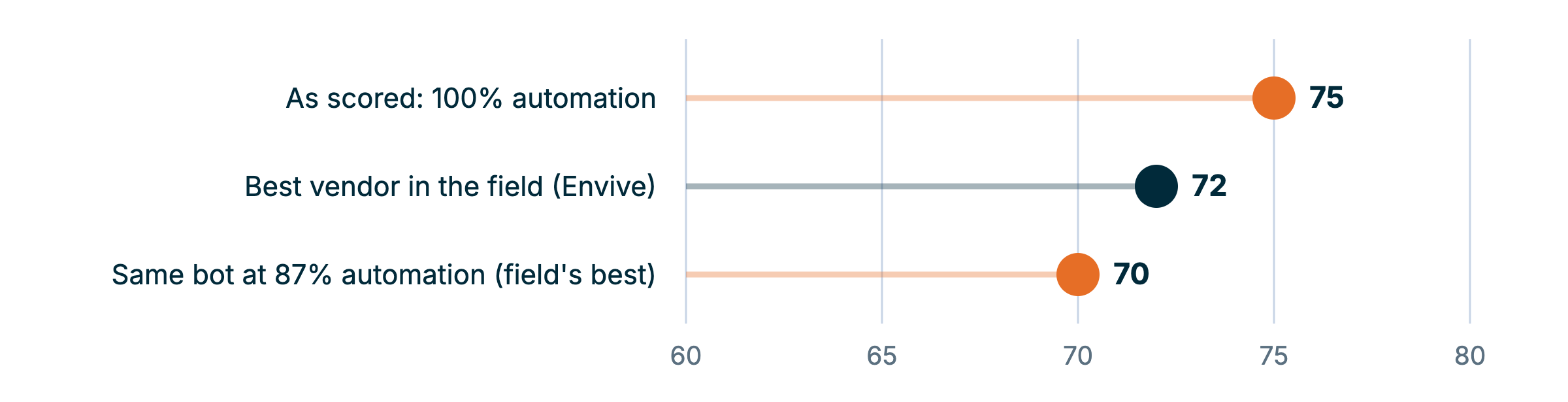
The quality scores are where the useful information is.
Which results are still good after a closer look
Even when looking at the results more critically, Odie still delivers in several areas:
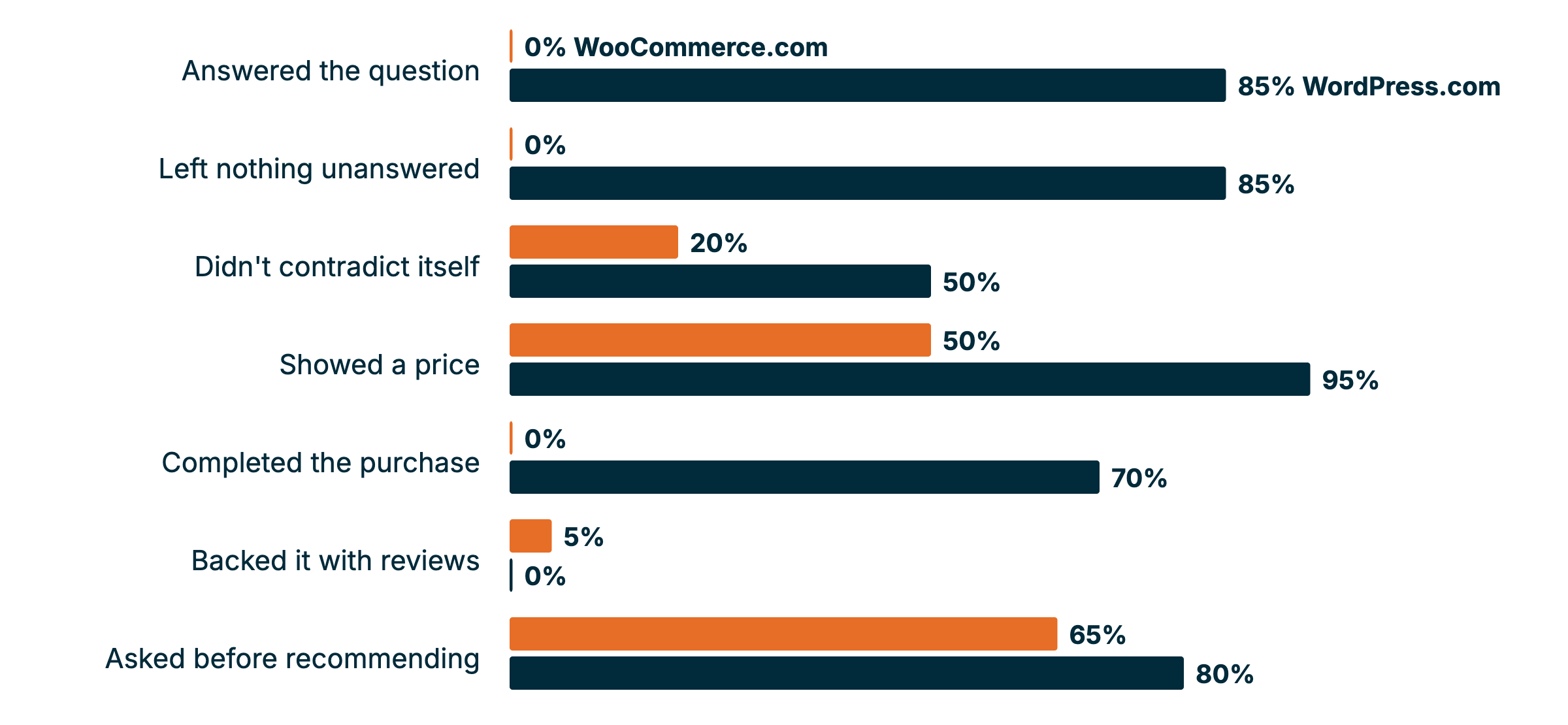
- WordPress.com pre-sale. Odie quoted prices in the visitor’s currency in 95% of chats, answered every question in 85%, and linked straight to the checkout for the plan it recommended. Its quality score of 85 is above Gorgias’s own agent at 75.
- Post-sale answers. On both sites Odie gave concrete, store-specific steps: menu paths, refund windows, the fix for a subscriptions site stuck in staging mode. Quality scored 88 on WordPress.com and 82 on WooCommerce. The best vendor in the Gorgias test scored 78.
- Asking first, then using the answers. It used the shopper’s country, budget and must-haves in every conversation and always named a specific product.
- Speed. Replies took 9 to 11 seconds, top three in all scenarios.
What we need to fix
However, we also did notice some areas where we have work cut out. Most of them are on WooCommerce.com, where the assistant has had less development time recently than the one on WordPress.com:
- WooCommerce pre-sale is our weakest scenario. Quality scored 58, against 85 for WordPress.com on the same rubric. Odie gave a price in half the chats, rarely shared star ratings (1 chat in 20), and never completed a purchase or offered an add-to-cart link, even though the product pages it links to show price and ratings. Fixing price and ratings alone is worth up to 23 quality points per conversation.
- Odie changes its mind mid-chat. Only 20% of WooCommerce and 50% of WordPress.com shopping chats had no contradictions. It says “fits your budget” before it knows the price, or recommends one plan at turn 5 and another at turn 7. In one chat it quoted £36 and then US$48 for the same plan.
- It keeps asking for a site address. Asking logged-out WordPress.com visitors for their domain is deliberate. Many people who contact us have sites hosted somewhere else, and Odie checking where a site lives is quicker than asking them to work it out. But in our two worst WordPress.com support chats, it asked for a domain or site URL in every turn instead of also offering the self-serve checks. One of them scored 15 out of 100. We’re checking whether that happens in real chats too, or only in our scripted ones.
- It doesn’t always say what happens next. One check looks at whether the bot tells the customer who acts next and when, something like “a Happiness Engineer will email you within a day.” Only 56% of WooCommerce and 73% of WordPress.com support chats did that. We don’t prompt Odie to do this today, and logged-out visitors rarely ask, so we still need to decide whether it’s worth adding.
These are all insights that will help us improve the Odie experience on both WooCommerce.com and WordPress.com.
Comparing apples and apples?
We also need to add a few caveats to the benchmarking tests we ran.
- We wrote the test, and Claude marked it. We used Gorgias’s conversation types, checks and weights, but the conversations were ours, and Claude scored them instead of Gorgias. So treat where Odie places as an estimate. We re-scored a sample of chats with a second, stronger judge, and the two agreed 92% of the time, or 83% for WordPress.com support. That’s why the WordPress.com support score is a range (82 to 90). Gorgias only trusts runs that agree 90% or more.
- Our sample is small. We ran about 20 chats per scenario. Gorgias’s ranking draws on hundreds of conversations per vendor over 90 days, so a gap of a few points between us and the field means little. We shouldn’t use this test to rank Odie as the #1 in class, but as one of the best in class. Only where there are bigger gaps, we are pretty confident we outrank the other tool.
- Our questions suit a docs-trained bot. Gorgias’s support questions are about orders: tracking a parcel, a damaged item. But since that’s not at all what we are selling, we focused on questions about our type of product. Ours leaned toward things the documentation answers well, because we don’t ship physical goods and the original scripts wouldn’t have made sense for us. That makes the comparison partly apples to oranges.
- Some checks cover things we never built Odie to do. Backing a recommendation with reviews and saying what happens next are two of them. We could add both, but any assistant scores better on a benchmark designed around what it already does, so read our misses on those checks with that in mind.
- We left gaps. Four WooCommerce support chats weren’t scored, and the WordPress.com support set never covered cancelling or changing a plan. Odie’s lead in both support scenarios is big enough that I don’t think this changes where it places.
- We messaged Odie directly instead of typing into the chat window. The answers are the same, but response times may differ from what a visitor sees.
The most useful check came from a colleague who reviews real WooCommerce chats by hand. They saw the same quality problems the benchmark found: wrong steps, invented specifics such as a license-key path that doesn’t exist, and replies that ignored details the merchant had already shared, like pasted logs. They also found something the benchmark missed: its link check passed for WooCommerce pre-sale, yet in real chats they often found no clickable link to a recommended extension or to the docs. A scripted test passed something real conversations fail.
A push to log in
Odie performs much better when a customer is logged into our system. Odie has access to data that can help create that experience. While we want to make sure that logged-out and prospect customers have a good experience, we also made the deliberate design choice to nudge people towards logging in.
I think it’s clear that we can improve that process going forward so it’s easier for people to create an account and/or log in via our help center, but it also means that we’re deliberately choosing to not bring the best experience into the logged-out center.
How to run your own test as a CX leader
If you run an AI agent in front of customers, I think it’s worth running it through a rubric someone else wrote. This adds a level of comparability, and forces you to honestly look at the performance of your tool.
Here are three takeaways if you plan to run a benchmark test like this as well:
- Read critically. On the first reading, the results were impressive, but it became soon clear that the weight Gorgias added to the scoring actually hid some of our weaknesses.
- Ask if the results support the experience you want to create. Our automation score went up because we lack a handoff, and that is pretty contradictory to the customer experience we have in mind. So, we were rewarded in the scoring for something we think is actually a problem to fix.
- Put the results next to real conversations. The benchmark and the manual review agreed on most things, but we actually found some extra challenges that the automated test didn’t find.
What happens next
The Happiness Engineers and code wranglers who tune Odie are going through the test chats to plan fixes, starting with WooCommerce shopping answers. When those changes are live, I’d like to run the same test again and write up what moved and what didn’t.
Have you put your own AI agent through a benchmark like this? What did the headline number hide from you?


Leave a Reply